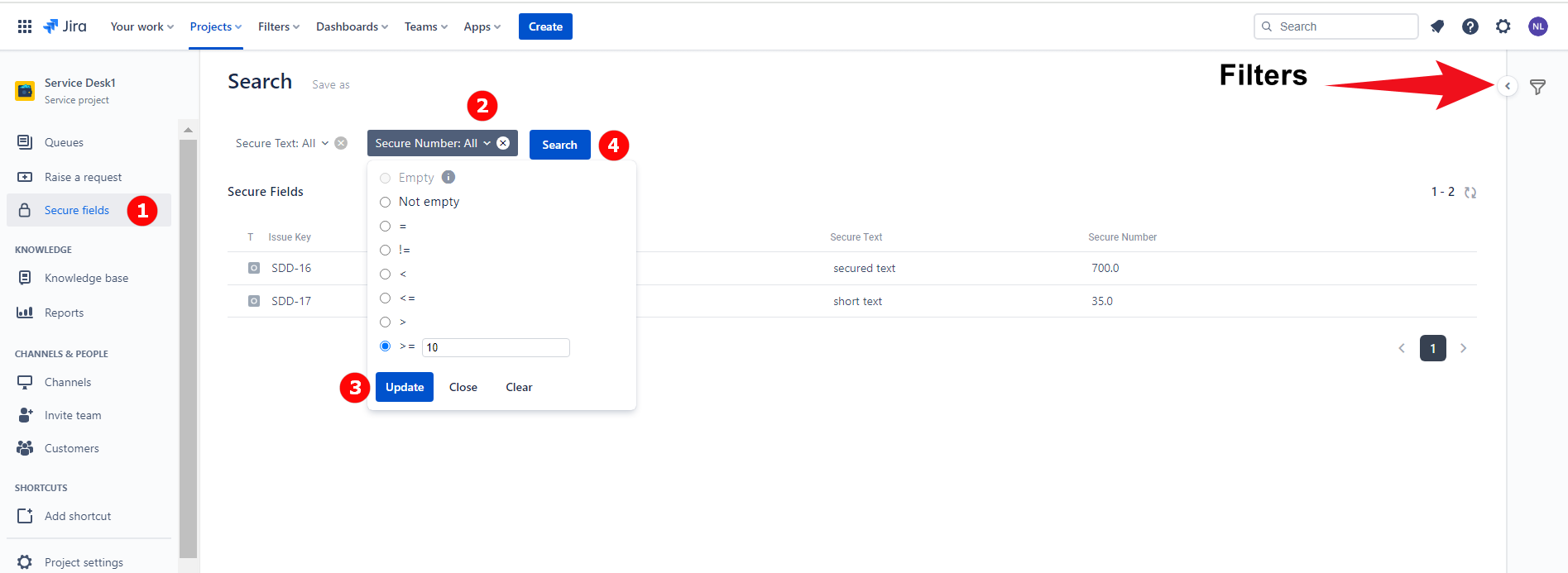
Please note that Secure fields search is only possible in the context of a specific project. Only users who have permission to Read the secure field are able to perform the search. |
Navigate to the needed project → proceed to the Secure fields page from the left-hand sidebar / top bar.
The Secure fields from this project will be displayed at the top of the page.
Select the Secure field you wish to search for and set a search criteria in the drop-down list → click Update.
Click on the Search button.
Issues with secure fields that match the search criteria will be displayed below. The search results can be sorted based on the secure field value.
The availability of search operators may vary depending on the type of secure field.
Number fields: Not empty, =, !=, <, <=, >, >=
Text fields: Not empty, =, !=, Contains, Not contains
Date fields: Not empty, =, !=, <, <=, >, >=
In order to export Secure fields values in the form of a CSV file, just search for the relevant issues using filter(s) and then press button at the top right corner of the page.
You can save time by creating a filter with defined search criteria.
After performing the search click Save as.
Type in the Name of the filter.
Set the Access type: Private / Project.
private - filter can be viewed and edited only by the owner
project - every user who has access to the project can view the filter
Tick “Create Jira filter” box in order to create a matching Jira filter.
Click Submit to confirm.
You can view all saved filters in the right-hand sidebar.

If you save your Secure fields search, tick the box “Create Jira filter“ and set the access type to “Project”, other users who have access to this project will be able to use the saved filter.
However, the number of issues returned by the filter depends on the user’s permission for the secure fields that are used as criteria. For example, if the filter contains the following criteria: SecureField_1 not Empty. It is saved by User_1 who has the READ permission for SecureField_1 and a matching Jira filter with the 'Project' access level is created. This filter returns 10 issues in total when utilised by User_1.
But, when the same filter is used by User_2 who does not have READ permission for SecureField_1, the filter will return 0 issues.