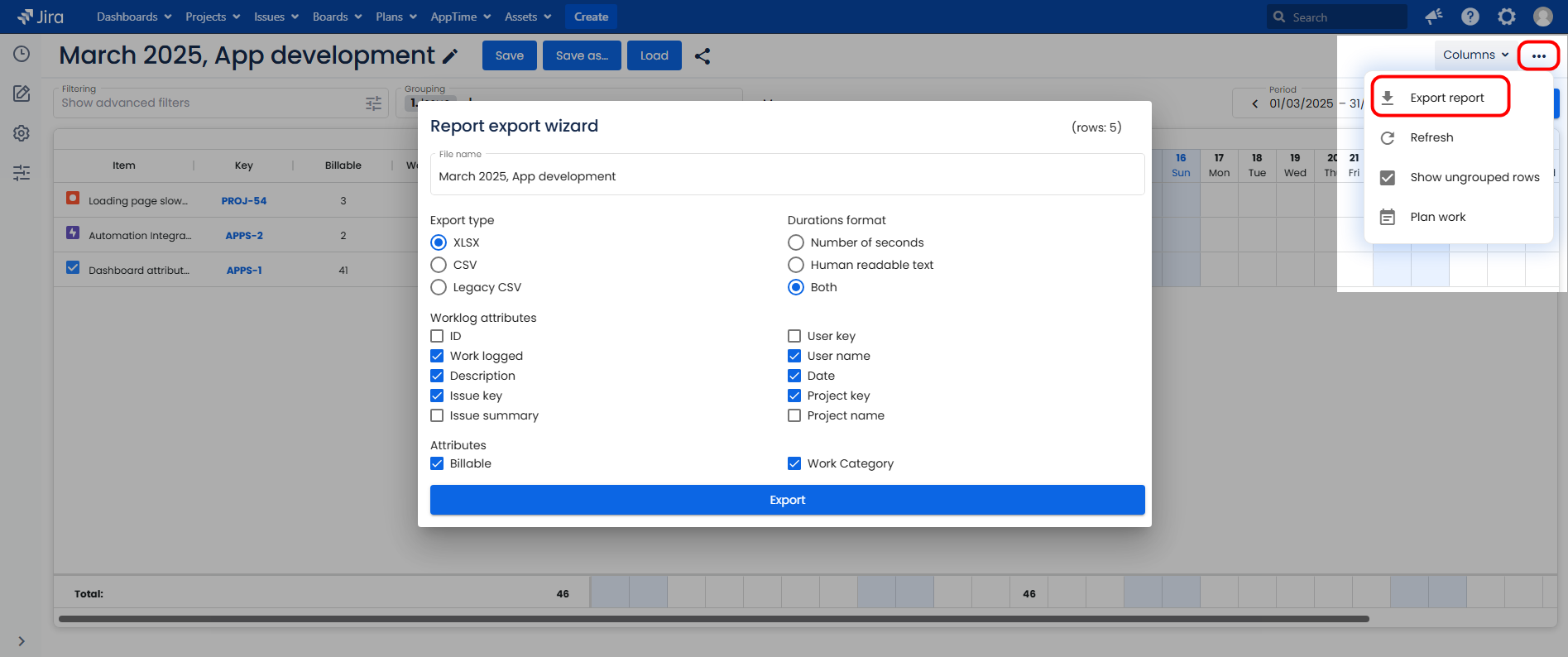
AppTime export feature allows users to pull their worklogs from Jira and download them in the selected format.
The worklog export is highly customizable: users can decide which attributes (including custom-added worklog enrichments) will be displayed in the report.
How to export a timesheet
- Select AppTime → Timesheets in Jira's top navigation bar.
- Open either a new timesheet or a saved one. You don't have to pre-save a timesheet to be able to export it.
- Add filters and/or adjust the date range to include the worklogs you want to download.
- Click on three horizontal dots in the top right-hand corner of the page → Export report.
- Select the desired format and fields to be included in the file → click Export.
Export wizard
After clicking the Export report button, the popup window with the export wizard will appear. The following export settings are available:
Export type (exported file format): XLSX, CSV, Legacy CSV. Legacy CSV exports only the standard columns; custom-added attributes are not included.
Durations format allows choosing the time format in the file: Number of seconds, Human readable format (minutes, hours, days, weeks) or include Both.
Worklog attributes are the standard columns that can be included or excluded in the export: ID (of the worklog entry), Work logged, Description, Issue key, Issue summary, User key, User name, Date, Project key, Project name.
Attributes refer to the custom-added attributes (enrichments) such as Billable and any other attributes added by the users.