Workload scheme is a set of expected working hours. Such schemes are assigned to the users so that daily working hours are always accurately defined.
You can create multiple schemes with varying workloads according to your company's work model.
New users will be automatically assigned to the Default Workload scheme. Default scheme can be edited but not removed.
Create a Workload scheme
Log in as a user with the 'Jira Administrators' global permission.
- Select AppTime → Timesheets in Jira's top navigation bar.
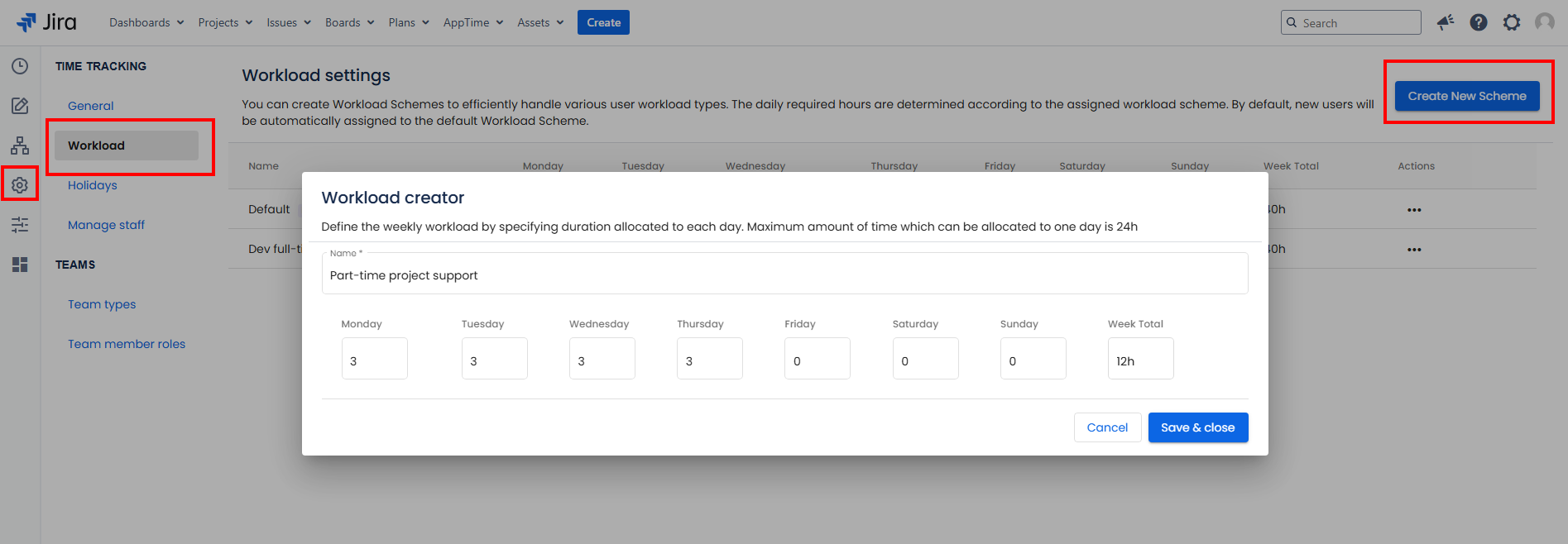
- From the sidebar menu, go to Settings → Workload → click "Create New Scheme" button at the top right-hand corner of the page.
Fill in the Scheme name and define the expected amount of working time for each day. Allowed format: minutes (m), hours (h), days (d).
- The summarized amount of time is loaded automatically in the "Week Total" field.
- Click Save&Close button to confirm.
You can assign the Workload scheme to users in Manage staff tab.
Edit a Workload Scheme
Log in as a user with the 'Jira Administrators' global permission.
- Select AppTime → Timesheets in Jira's top navigation bar.
- From the sidebar menu, go to Settings → Workload.
- Locate the Scheme you wish to modify and click on the three horizontal dots in the Actions section → Edit.
- Make necessary adjustments → Click Save&Close button.
Remove a Workload Scheme
Log in as a user with the 'Jira Administrators' global permission.
- Select AppTime → Timesheets in Jira's top navigation bar.
- From the sidebar menu, go to Settings → Workload.
- Locate the Scheme you wish to remove and click on the three horizontal dots in the Actions section → Remove → Confirm.