This feature allows you to create Team types according to your organization's work model.
Team types are used for precise categorisation of staff teams, e.g. according to their core functions or purpose.
Create a Team type
Log in as a user with the 'Jira Administrators' global permission.
- Select AppTime → Timesheets in Jira's top navigation bar.
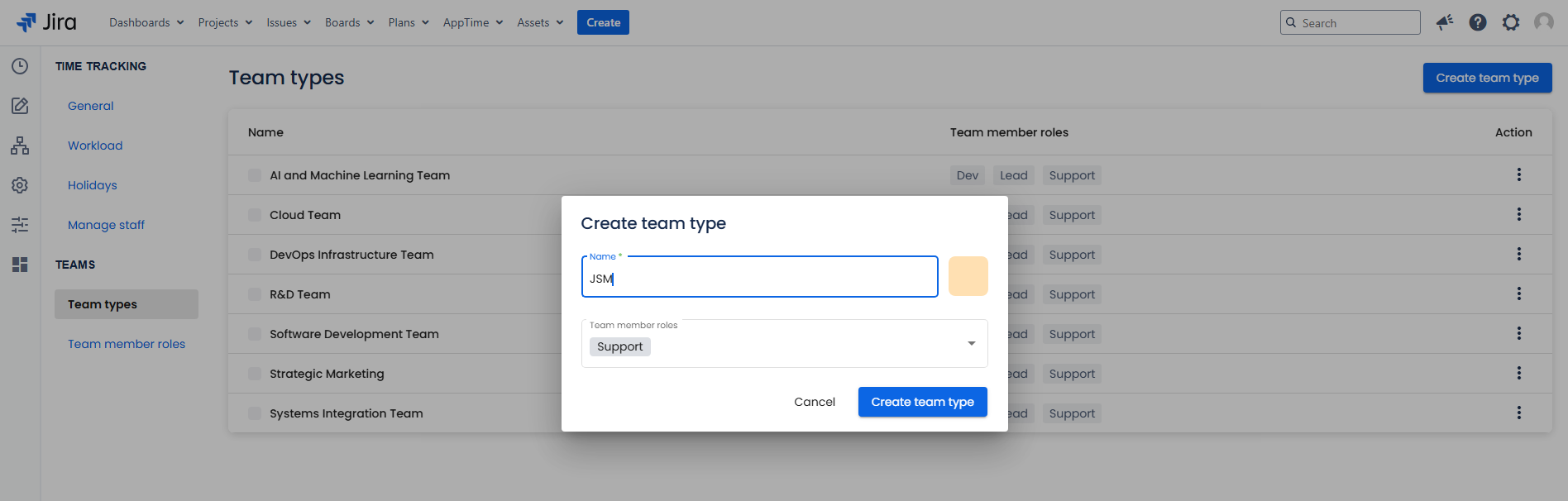
- From the sidebar menu, go to Settings → Team types→ click "Create team type" button at the top right-hand corner of the page.
- Enter the Team type name and select a colour (optional).
- Assign Team member roles that apply to the current Team type.
- Confirm by clicking "Create team type".
Edit a Team type
Log in as a user with the 'Jira Administrators' global permission.
- Select AppTime → Timesheets in Jira's top navigation bar.
- From the sidebar menu, go to Settings → Team types
- Locate the Team type you wish to modify and click on the three vertical dots in the Action section → Edit team type.
- Make necessary adjustments → Click Save to confirm.
Delete a Team type
Log in as a user with the 'Jira Administrators' global permission.
- Select AppTime → Timesheets in Jira's top navigation bar.
- From the sidebar menu, go to Settings → Team types.
- Locate the Team type you wish to delete and click on the three vertical dots in the Action section → Delete team type → Confirm.