Team member roles allow you to define and assign different roles according to each employee's workload within the particular team.
Roles help to overview the overall team structure and divide users' workload effectively based on their Teams membership and roles.
Create a Team member role
Log in as a user with the 'Jira Administrators' global permission.
- Select AppTime → Timesheets in Jira's top navigation bar.
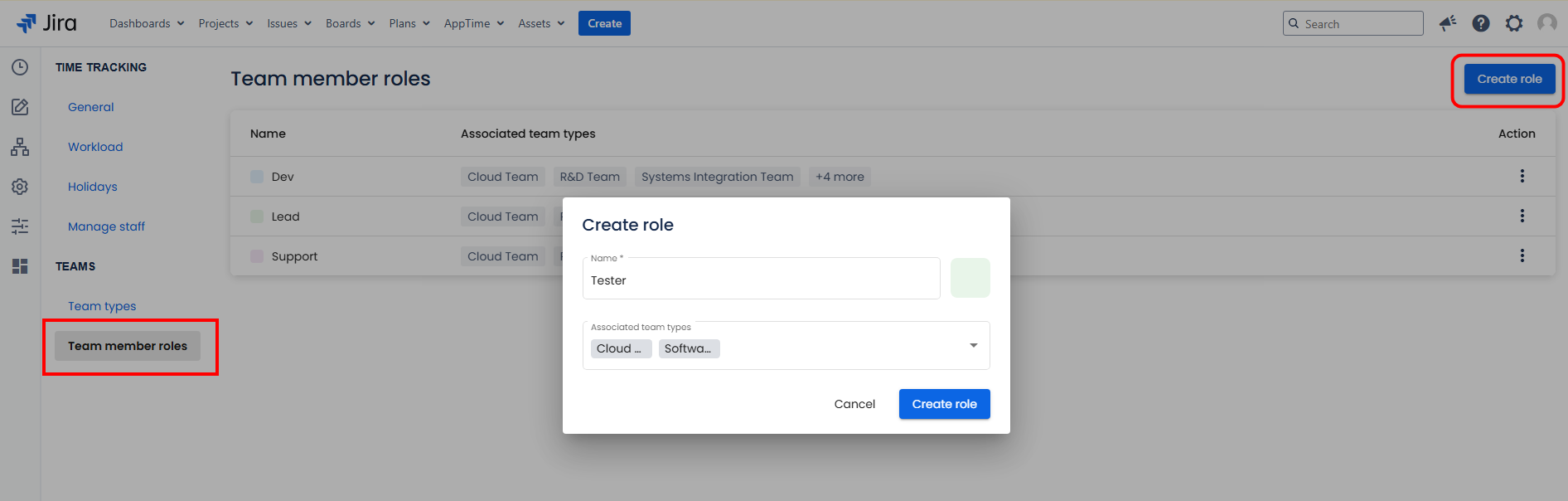
- From the sidebar menu, go to Settings → Team member roles → click "Create role" button at the top right-hand corner of the page.
- Enter the Team member role name and select a colour (optional).
- Assign Team types associated with the current Team member role.
- Confirm by clicking "Create role".
Edit a Team member role
Log in as a user with the 'Jira Administrators' global permission.
- Select AppTime → Timesheets in Jira's top navigation bar.
- From the sidebar menu, go to Settings → Team member roles.
- Locate the role you wish to modify and click on the three vertical dots in the Action section → Edit role.
- Make necessary adjustments → Click Save to confirm.
Delete a Team member role
Log in as a user with the 'Jira Administrators' global permission.
- Select AppTime → Timesheets in Jira's top navigation bar.
- From the sidebar menu, go to Settings → Team member roles.
- Locate the role you wish to delete and click on the three vertical dots in the Action section → Delete role → Confirm.